How We Use AI to Build User-Centric Products
Alex Finnemore · Mike Joyce · Goose Group
We Build AI Software. But Really, We're Product People.
Product managers, engineers, UX designers — we've had all of these roles. We build custom software for companies, but the hard part was always the hard part: understanding what people actually need and making good decisions about what to build.
Over the last two years, we figured out how to use AI tools to spend more time on the actual work. This is what we learned.
How We Got Here
This is a maturity model. Each level feeds the next. Chatbot use reveals what context to build. Context makes agents useful. Agent use reveals what tools to build. You don't leave levels behind — they stack. Read more on AI capability maturity →
The Messy Middle Is Normal
You use AI. It helps sometimes. But it's kind of... generic? You paste something in, get something back, fix it, paste it somewhere else.
It works. But it doesn't feel like it's changing how you work. And there's this background question — am I falling behind? Is everyone else figuring this out faster?
We've been through that. What changed wasn't a better model. It was getting specific about what we actually know and care about, and giving the AI that context.
Product Design Is Our Skill. It's Where We Want to Spend Our Time.
The Product Design Lifecycle
Each loop is where your judgment matters. This process doesn't change.
Where We Get the Most Out of AI
We made a choice about our relationship to AI. Where does it give us the most autonomy to do the work that matters?
What we keep doing
What AI handles
What doesn't change
You are responsible for your customer's durable outcomes. That means you own what AI systems produce — every output, every decision, every edge case. More output means more to review. Build your QA and review processes accordingly.
Encode the Outer Layers. Compress Them Into the Center.
Before
After: encoded
The ceremonies don't disappear. They get smaller, because the thinking that used to happen only in the room is now encoded and available everywhere. Encode it or lose it.
Solve for the Center. The Rest Follows.
- When your research is structured, you don't need a meeting to share it.
- When your specs are clear, the design review is a conversation, not a presentation.
- When your handoffs are complete, engineers stop asking "what did you mean?"
Fix the center ring. The outer rings get lighter on their own.
The outer layers exist because the center — building software, creating solutions — used to be really expensive. Layers of PM and bureaucracy grew up to manage that cost. When the center gets easier and more abundant, those layers become dilutive. They don't disappear on their own. But they stop being load-bearing.
The Job Is the Same
Use your expertise, with the best tools available, to generate durable outcomes for your customers.
The tools are changing what you can do. Not what your job is. You design products for your customers — that doesn't change. What changes is the leverage available to you.
Craftspeople build their own tools. An oboe player doesn't buy reeds off the shelf. A blacksmith doesn't buy their hammers. The best practitioners in any field shape their tools to fit their judgment. That's part of the work now too.
Most Problems Are the Same Shape
What This Looks Like for Us
17 playbooks, dozens of skills, hundreds of context docs, and the tools to tie them together. We're building organizational infrastructure that lets us build faster for our customers.
This is always changing. New customers, new output styles, new methods and tools arrive. The pipeline isn't a fixed thing — it compounds. Keep building.
One Customer Conversation Through Our Pipeline (Alex Demos)
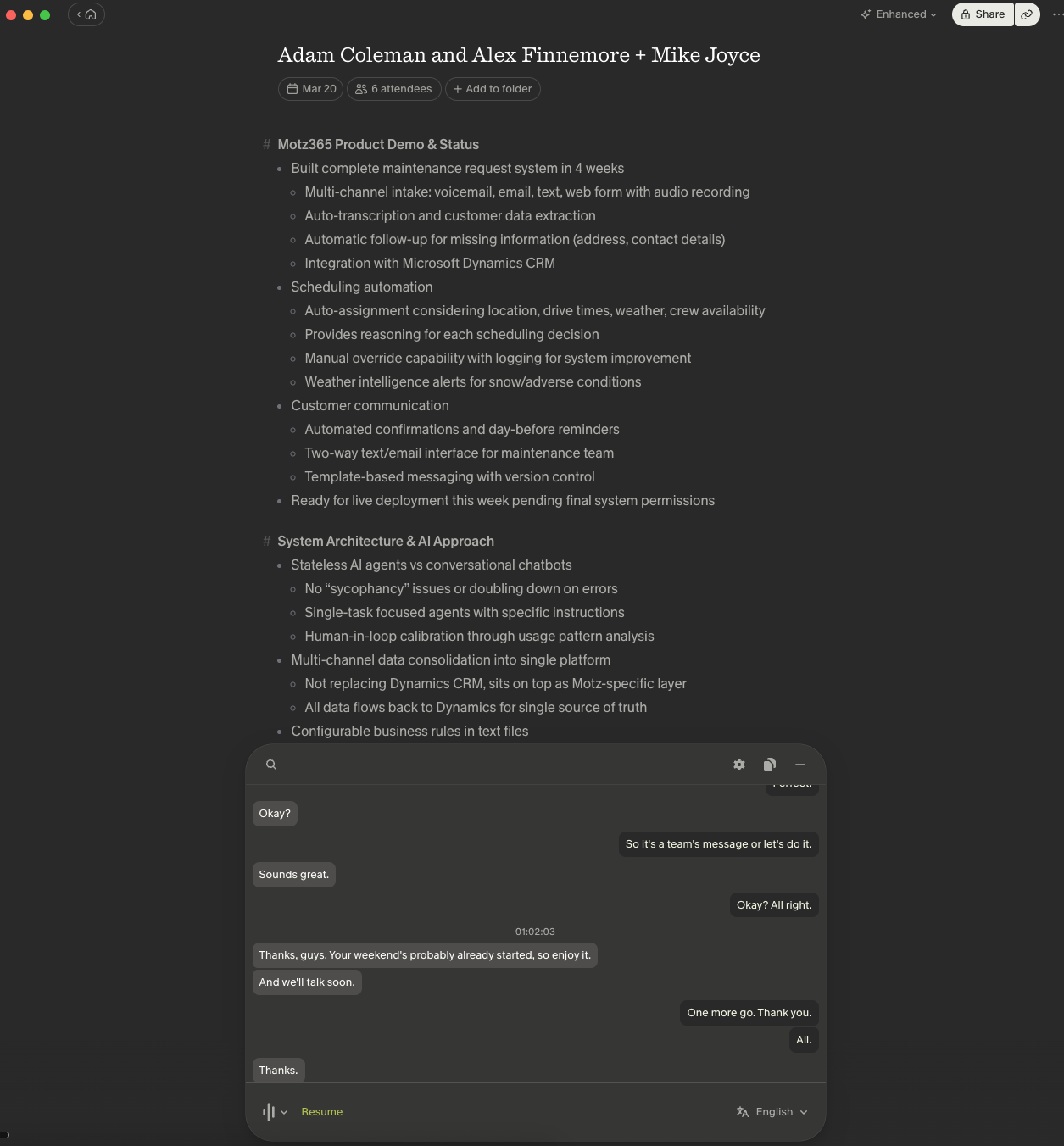 Interview transcript
 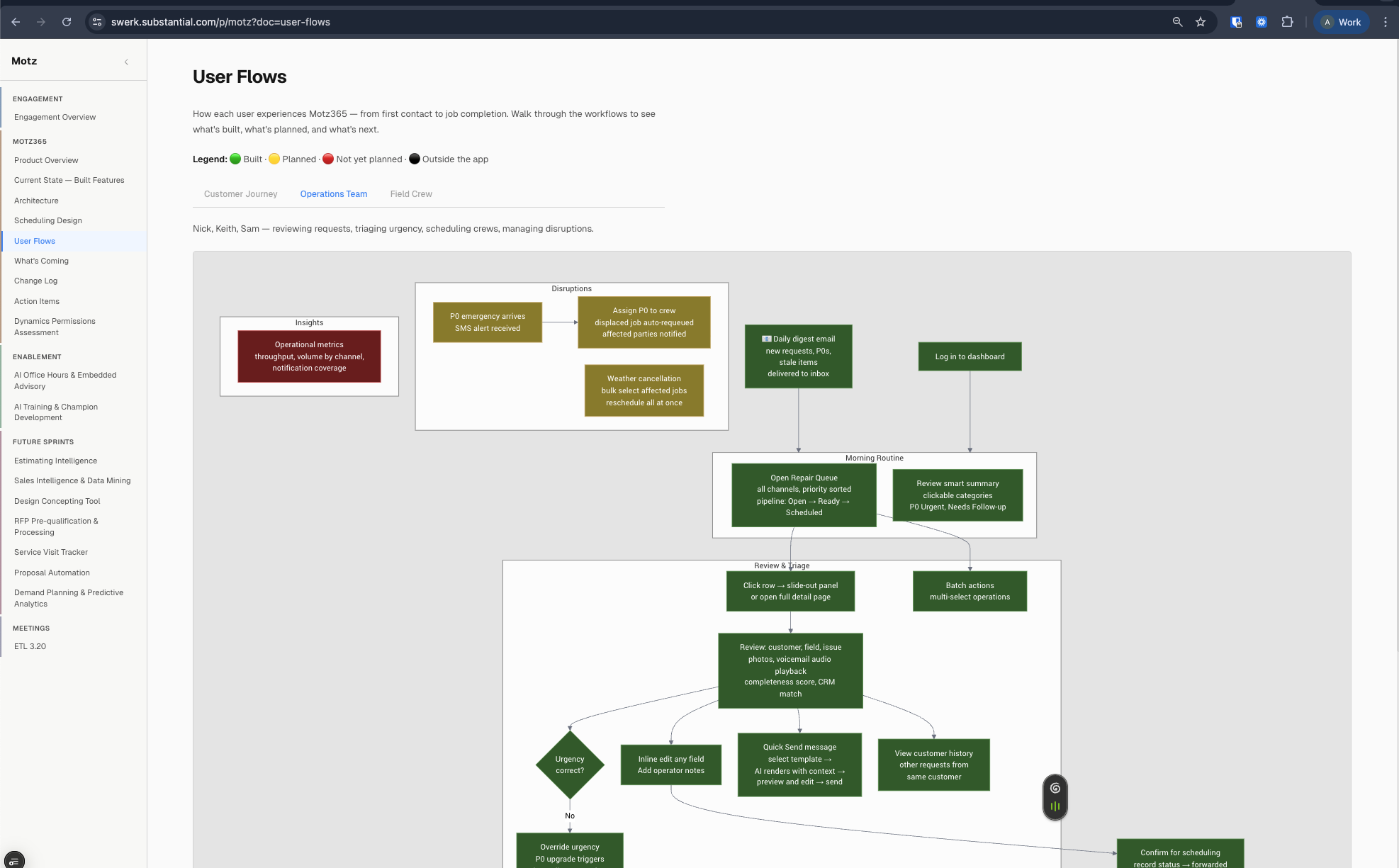 Workflow diagram from the interview
 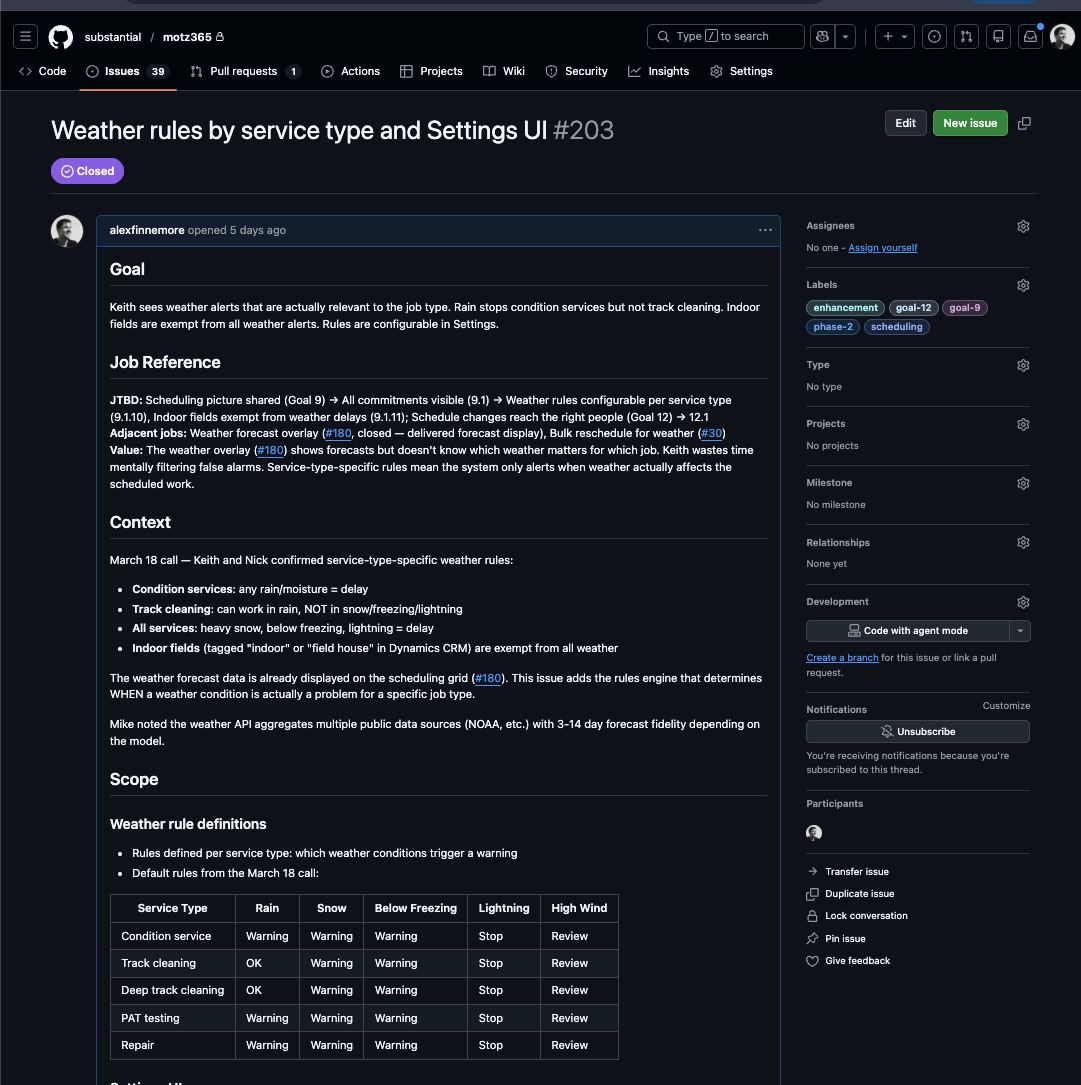 GitHub issue written from the diagram
 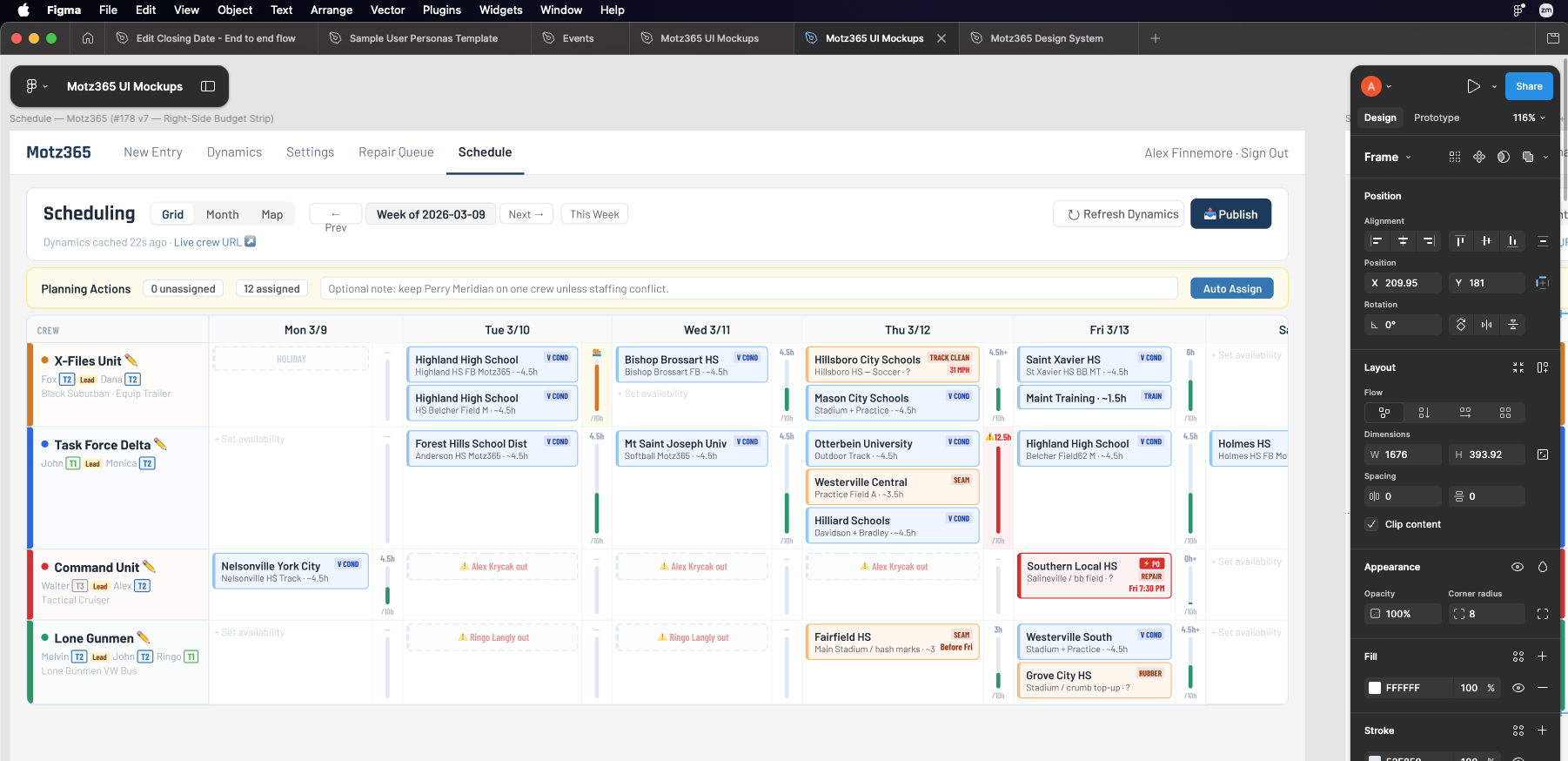 Figma mockup generated from the issue
 We Started With One Tool for One Step
The first thing we built was a tool to process interview transcripts. One conversation in, five structured documents out.
That revealed the next bottleneck. Then the next. A year later: playbooks, skills, hundreds of curated context docs, tools like Smaak and Swerk. An entire corpus that lets us say "make a compelling presentation for the UX team at Lime" — and get something real back.
You need one. The first one shows you where the next problem is.
A Design System for Your Judgment
Your design system compounds — every new screen is faster because the system exists. But until now, you couldn't do the same for how your team thinks, decides, and builds. Decks in drives nobody opens. Stale onboarding docs. Principles on a wall but not in the work.
These tools change that. Playbooks, skills, context docs — a design system for your judgment. AI reads it, and using it is how you maintain it.
The same compounding — applied to everything else your team knows.
Three Things You Can Build
Our Recommendation: Map Your System
Connect Claude Code or Codex to your ops repo. Use it — with your taste doc — to inspect the codebase and build a service blueprint. Mermaid charts that map how the apps work and how they connect to the real world. What happens when someone replaces a battery?
You'll find the dark spots on the map. Tactical bugs now, and a piece of corpus that's useful forever.
What this unlocks
"If I make this change, what downstream impacts does it have? Do we need to update any UI actions or trainings for warehouse staff?"
Start by Starting
We created a starter kit with templates for Lime you can use this week. Plain markdown files — they work with Gemini, Claude, whatever you already have.
You're already doing this. The skills you've built for yourself — the shortcuts, the templates, the ways you've trained AI to be useful — those are playbooks. This is just more of that.
Alex Finnemore · alex@goosegroup.co
Mike Joyce · mike@goosegroup.co
Appendix
Reference material for further reading and discussion.
The Lack of a Tool Was the Bottleneck. So We Built One.
There was no way to store how a team thinks — principles, constraints, behavioral rules — in a form AI can read. Every conversation started from zero.
So we built Smaak (Dutch for taste). It stores encoded judgment so AI reads it before every interaction. No copy-paste. No rebuilding context. No generic output.
A well-written markdown file does 80% of the work. The tool makes it easier to maintain and share across everything.
Tastemaking as Infrastructure
Taste isn't subjective fluff. It's a team's accumulated judgment about what good looks like — encoded in a form that compounds.
Your design system says "this is what a button looks like." A taste doc says "this is what good UX judgment looks like at Lime." When AI can read both, it stops producing generic output and starts producing output with a point of view.
This is the thesis behind everything we build. The tools, the playbooks, the skills — they're all infrastructure for making taste operational.
Our Website Is a Corpus
Everything on goosegroup.co — manifesto, beliefs, playbooks, this deck — is structured content our agents read. When we ask "is our messaging consistent?" the agent checks everything and tells us where things have drifted.
Every document you publish is a document agents can use. Your Confluence, research repo, design system docs — they could work the same way.